[Flutter / 플러터] No more 파이어베이스! MySQL로 플러터 앱 만들기 part1,2
기본 소스 코드(코딩셰프)
GitHub - icodingchef/mysql_git: mysql_part1
mysql_part1. Contribute to icodingchef/mysql_git development by creating an account on GitHub.
github.com
XAMPP 설치 = 서버설치
(* 참고
기존에 이미 apache나 mariaDB 등이 설치되어 있는 경우 에러가 발생한다고 함. 코딩셰프 강사님이 참고하라는 블로그가 있으니 혹시나 에러나면 참조. https://patiencelee.tistory.com/1108 )
Download XAMPP
Includes: Apache 2.4.54, MariaDB 10.4.27, PHP 8.0.25 & PEAR + SQLite 2.8.17/3.38.5 + multibyte (mbstring) support, Perl 5.34.1, ProFTPD 1.3.6, phpMyAdmin 5.2.0, OpenSSL 1.1.1s, GD 2.2.5, Freetype2 2.4.8, libpng 1.6.37, gdbm 1.8.3, zlib 1.2.11, expat 2.0.1,
www.apachefriends.org
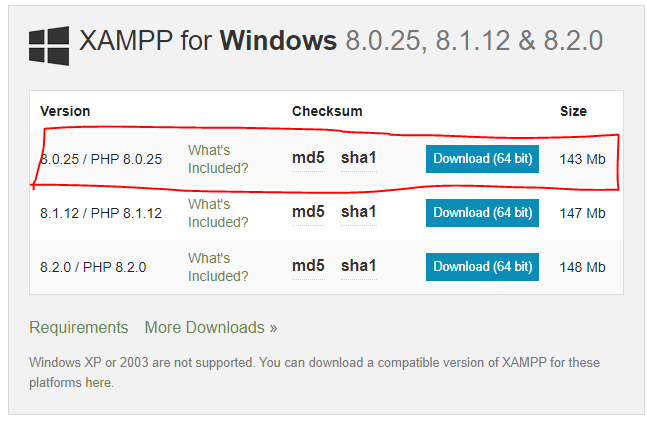
> 다운 후, Next 쭉쭉 눌러서 설치
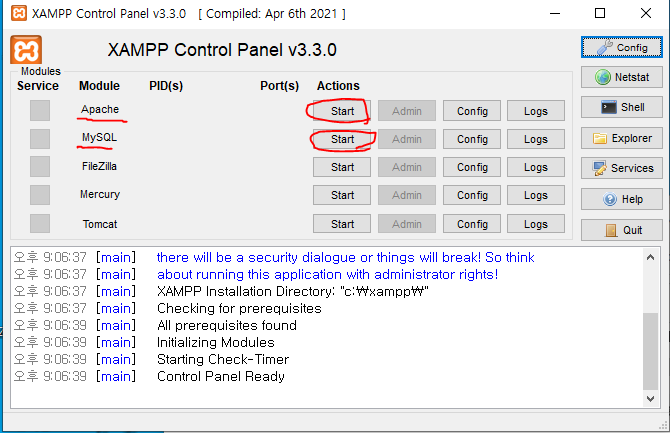
> 실행되면 아파치와 MySQL 실행
> 주소창에 http://localhost/phpmyadmin/ 입력하면 어드민창 잘 뜸 = 서버가 잘 구동됨
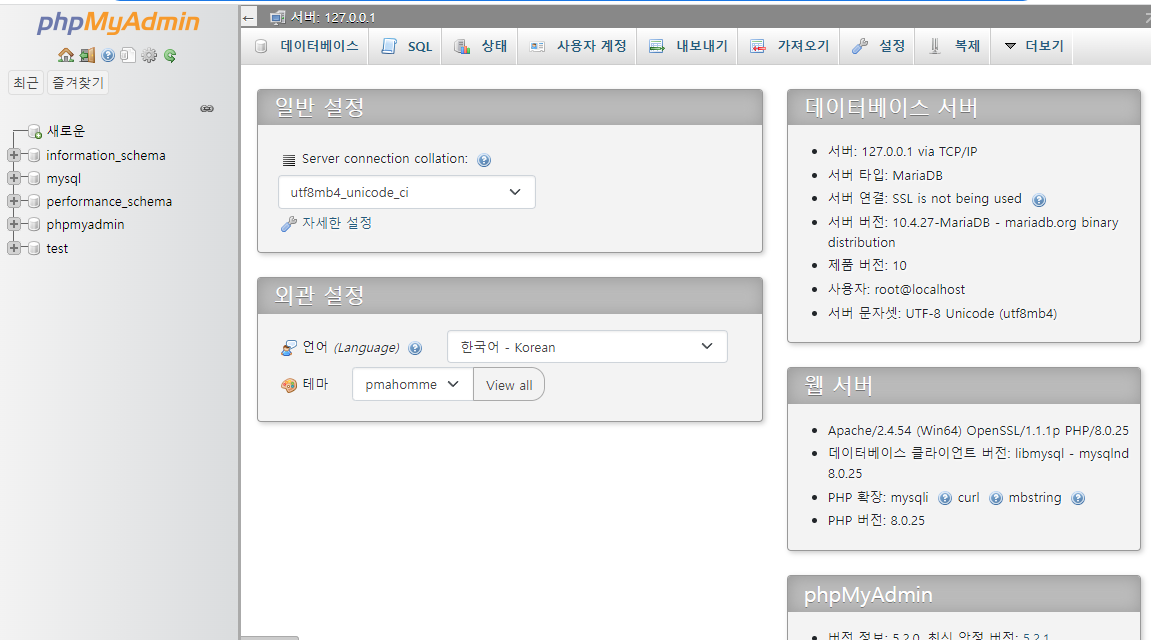

> '새로운' 눌러서 new_members라고 데이터베이스 생성
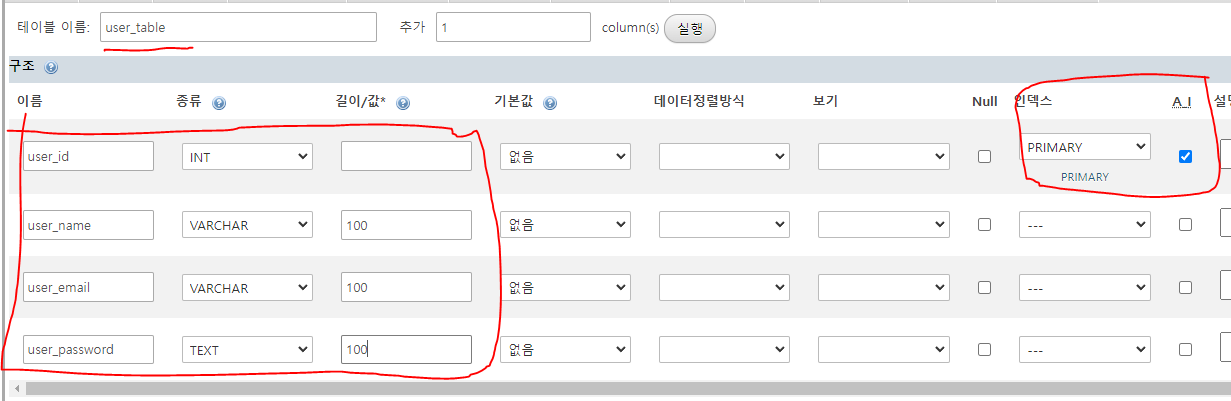
> 테이블 생성하기
> user_id는 PK로 지정(AI는 자동으로 id 숫자를 증가시켜주는(1,2,3...) 시퀀스 같은 것)

> 해당 폴더 위치로 가서 api_new_members 폴더 생성
API와 앱 연동의 개념

Dart : 프론트엔드 언어 / UI,UX 제공
mySQL : 서버 / 데이터 저장
PHP : 서버 사이드 언어 및 백엔드 언어 / 서버와 통신을 하기 위함, API 개발시 사용
API : 앞단에서 뒷단에 데이터를 요청 시, 필요한 사용 규칙 제공해 주는 것
- 회원가입 예시
1. 앱에서 회원가입을 위해 정보를 입력하고 버튼 누르면 API로 request가 전달됨
2. 요청을 받은 API는 즉시 MySQL로 request를 보내서 사용자 데이터 저장
3. 저장이 잘 되면 서버에서 API로 response(응답) 보냄
4. API는 계정 생성이 성공했다는 response 보냄
request와 response를 위해 http의 POST(저장)/GET(가져옴) 메서드 사용
폴더 및 파일 생성
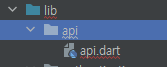
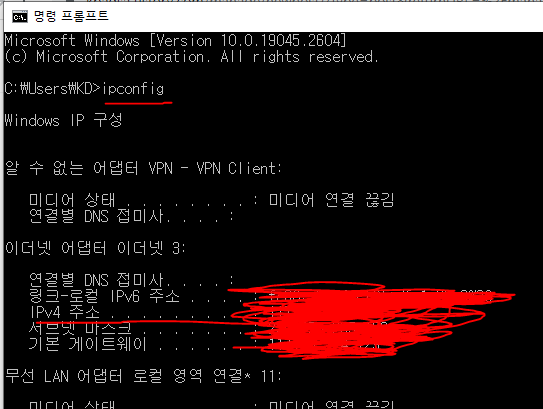
> cmd 창에서 본인 주소 확인
//api.dart

class API{
  static const hostConnect = "http://본인 주소/api_new_members";
}VSC에서 PHP로 API 개발하기
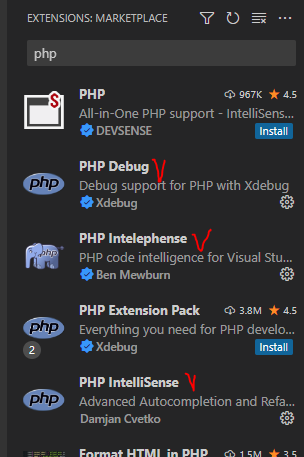
> vsc에서 3개 다운
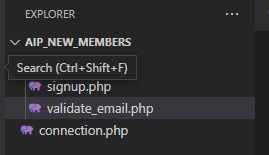
> (api인데 폴더이름 틀림) 폴더 열어서 위의 파일 3개 생성
//connection.php

<?php
$myServer = "localhost";
$user = "root";
$password = "";
$database = "new_members";

//데이터베이스 연결
$connection = new mysqli($myServer, $user, $password, $database);//signup.php
<?php
include'../connection.php';
$userName = $_POST['user_name'];
$userEmail = $_POST['user_email'];
$userPassword = md5($_POST['user_password']); //md5:식별할 수 없는 바이너리 포맷으로 바꿔서 보안 강화
//query문
$sqlQuery = "INSERT INTO user_table SET user_name = '$userName',
user_email = '$userEmail', user_password = '$userPassword'";
$resultQuery = $connection -> query($sqlQuery);//validate_email.php
<?php
include'../connection.php';
$userEmail = $_POST['user_email'];
//query문
$sqlQuery = "SELECT * FROM user_table WHERE user_email = '$userEmail'";
$resultQuery = $connection -> query($sqlQuery);
if($resultQuery -> num_rows > 0){ //이미 같은 이메일 주소가 있을때 1
echo json_encode(array("existEmail => true"));
}else{
echo json_encode(array("existEmail => false"));
}
//api.dart

class API{
  static const hostConnect = "http://117.55.174.157/aip_new_members";
  static const hostConnectUser = "$hostConnect/user";

  static const signup = "$hostConnect/user/signup.php";
  static const validateEmail = "$hostConnect/user/validate_email.php";
}> 연결
http 설치
https://pub.dev/packages/http/install
//signup.dart

checkUserEmail() async{
  try{
    var response = await http.post(Uri.parse(API.validateEmail),
        body: {'user_email': emailController.text.trim()});

    if(response.statusCode == 200){ //단순히 서버와 연동 여부 확인
      var responseBody = jsonDecode(response.body);

      if(responseBody['existEmail'] == true){
        Fluttertoast.showToast(msg: "Email is already in use. Please try another email.");
      };
    }
  }catch(e){ }
}//model.dart
//MySQL 데이터베이스에 json 포맷으로 저장하기 위해서 json포맷으로 바꿔주기 위한 model
class User{
int user_id;
String user_name;
String user_email;
String user_password;
User(this.user_id, this.user_name, this.user_email, this.user_password);
Map<String, dynamic> toJson() => {
'user_id' : user_id.toString(),
'user_name' : user_name,
'user_email' : user_email,
'user_password' : user_password
};
}//signup.dart
saveInfo() async{
User userModel = User(
1,
userNameController.text.trim(),
emailController.text.trim(),
passwordController.text.trim()
);
try{
var res = await http.post(Uri.parse(API.signup),
body: userModel.toJson()
);
if(res.statusCode == 200){
var resSignup = jsonDecode(res.body);
if(resSignup['success'] == true){
Fluttertoast.showToast(msg: 'Signup successfully.');
}else{
Fluttertoast.showToast(msg: 'Error occurred. Please try again.');
}
}
}catch (e){
print(e.toString());
Fluttertoast.showToast(msg: e.toString());
}
}
.
.
  if(responseBody['existEmail'] == true){
    Fluttertoast.showToast(msg: "Email is already in use. Please try another email.");
  };
}else{
  saveInfo();
}
.
.> 중복된 이메일이 아닐때 저장되도록 saveInfo() 추가

> 사인업 버튼 onTap()
setState(() {
  userNameController.clear();
  emailController.clear();
  passwordController.clear();
});> 정상적으로 가입되었을때 textfield 지우기
* 에러
type 'string' is not a subtype of type 'int' of 'index' 라는 에러가 계속 됐다.
user.dart 가 잘못된줄 알고 계속 하다가 php 파일이 오류라는 걸 알았음
제대로 잘 보고 적기!

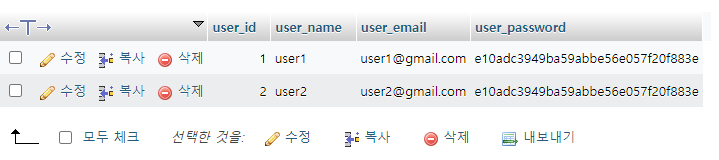
> 잘 실행되서 저장됨
[Flutter / 플러터] No more 파이어베이스! MySQL로 로그인 및 Shared preferences 구현하기
//login.php

<?php
include '../connection.php';

$userEmail = $_POST['user_email'];
$userPassword = md5($_POST['user_password']);

$sqlQuery = "SELECT * FROM user_table WHERE user_email = '$userEmail'
    AND user_password = '$userPassword'";

$resultQuery = $connection -> query($sqlQuery);

if($resultQuery -> num_rows > 0){

    $userRecod = array();
    while($rowFound = $resultQuery -> fetch_assoc()){
        $userRecod[] = $rowFound;
    }
    echo json_encode(
        array(
            "success" => true,
            "userData" => $userRecor[0]
        )
        );

    echo json_encode(array("success" => true));
 }else{
     echo json_encode(array("success" => false));
 }
//api.dart

static const login = "$hostConnect/user/login.php"; //추가//login.dart
userLogin() async{
try {
var res = await http.post(
Uri.parse(API.login),
body: {
'user_email' : emailController.text.trim(),
'user_password' : passwordController.text.trim()
});
if(res.statusCode == 200){
var resLogin = jsonDecode(res.body);
if(resLogin['success'] == true){
Fluttertoast.showToast(msg: 'Login successfully');
User userInfo = User.fromJson(resLogin['userData']);
setState(() {
emailController.clear();
passwordController.clear();
});
}else{
Fluttertoast.showToast(msg: 'Please chcek your email and password');
}
}
} catch (e) {
print(e.toString());
Fluttertoast.showToast(msg: e.toString());
}
}

> 생성
shared_preferences
: 특정 데이터를 사용자 폰에 있는 로컬 저장소에 저장
shared_preferences | Flutter Package
Flutter plugin for reading and writing simple key-value pairs. Wraps NSUserDefaults on iOS and SharedPreferences on Android.
pub.dev
//user_pref.dart

import 'dart:convert';
import 'package:getx_mysql_tutorial/model/user.dart';
import 'package:shared_preferences/shared_preferences.dart';

class RememberUser {
  static Future<void> saveRememberUserInfo(User userInfo) async {
    SharedPreferences preferences = await SharedPreferences.getInstance();
    String userJsonData = jsonEncode(userInfo.toJson());
    await preferences.setString("currentUser", userJsonData);
  }
}
if(formKey.currentState!.validate()){
  userLogin();
}> 로그인 버튼에 추가
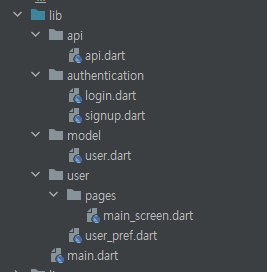
전체파일
api/api.dart
class API{
  static const hostConnect = "http://117.55.174.157/api_new_members";
  static const hostConnectUser = "$hostConnect/user";

  static const signup = "$hostConnect/user/signup.php";
  static const login = "$hostConnect/user/login.php";
  static const validateEmail = "$hostConnect/user/validate_email.php";
}
authentication/login.dart
import 'dart:convert';

import 'package:flutter/material.dart';
import 'package:get/get.dart';
import 'package:getx_mysql_tutorial/api/api.dart';
import 'package:getx_mysql_tutorial/model/user.dart';
import 'package:getx_mysql_tutorial/user/pages/main_screen.dart';
import 'package:getx_mysql_tutorial/user/user_pref.dart';
import 'package:google_fonts/google_fonts.dart';
import 'package:getx_mysql_tutorial/authentication/signup.dart';
import 'package:http/http.dart' as http;
import 'package:fluttertoast/fluttertoast.dart';

class LoginPage extends StatefulWidget {
  const LoginPage({Key? key}) : super(key: key);

  @override
  State<LoginPage> createState() => _LoginPageState();
}

class _LoginPageState extends State<LoginPage> {

  var formKey = GlobalKey<FormState>();
  var emailController = TextEditingController();
  var passwordController = TextEditingController();

  userLogin() async{
    try {
      var res = await http.post(
          Uri.parse(API.login),
          body: {
            'user_email' : emailController.text.trim(),
            'user_password' : passwordController.text.trim()
          });

      if(res.statusCode == 200){
        var resLogin = jsonDecode(res.body);
        if(resLogin['success'] == true){
          Fluttertoast.showToast(msg: 'Login successfully');
          User userInfo = User.fromJson(resLogin['userData']);

          await RememberUser.saveRememberUserInfo(userInfo);
          Get.to(MainScreen());

          setState(() {
            emailController.clear();
            passwordController.clear();
          });
        }else{
          Fluttertoast.showToast(msg: 'Please chcek your email and password');
        }
      }
    } catch (e) {
      print(e.toString());
      Fluttertoast.showToast(msg: e.toString());
    }
  }

  @override
  Widget build(BuildContext context) {
    return Scaffold(
      backgroundColor: Colors.grey[300],
      body: SafeArea(
        child: Center(
          child: SingleChildScrollView(
            child: Column(
              mainAxisAlignment: MainAxisAlignment.center,
              children: [
                Icon(
                  Icons.phone_android,
                  size: 100,
                ),
                SizedBox(
                  height: 30,
                ),
                Text(
                  'Hello',
                  style: GoogleFonts.bebasNeue(fontSize: 36.0),
                ),
                SizedBox(
                  height: 10,
                ),
                Text(
                  'Welcome back',
                  style: TextStyle(
                    fontSize: 20,
                    fontWeight: FontWeight.bold,
                  ),
                ),
                SizedBox(
                  height: 50,
                ),
                Form(
                  key: formKey,
                  child: Column(
                    children: [
                      Padding(
                        padding: const EdgeInsets.symmetric(horizontal: 25.0),
                        child: Container(
                          decoration: BoxDecoration(
                            color: Colors.grey[200],
                            border: Border.all(color: Colors.white),
                            borderRadius: BorderRadius.circular(12),
                          ),
                          child: Padding(
                            padding: const EdgeInsets.only(left: 20.0),
                            child: TextFormField(
                              controller: emailController,
                              validator: (val) =>
                              val == "" ? "Please enter email" : null,
                              decoration: InputDecoration(
                                  border: InputBorder.none, hintText: 'Email'),
                            ),
                          ),
                        ),
                      ),
                      SizedBox(
                        height: 10,
                      ),
                      Padding(
                        padding: const EdgeInsets.symmetric(horizontal: 25.0),
                        child: Container(
                          decoration: BoxDecoration(
                              color: Colors.grey[200],
                              border: Border.all(color: Colors.white),
                              borderRadius: BorderRadius.circular(12)),
                          child: Padding(
                            padding: const EdgeInsets.only(left: 20.0),
                            child: TextFormField(
                              controller: passwordController,
                              validator: (val) =>
                              val == "" ? "Please enter password" : null,
                              obscureText: true,
                              decoration: InputDecoration(
                                  border: InputBorder.none, hintText: 'Password'),
                            ),
                          ),
                        ),
                      ),
                    ],
                  ),
                ),
                SizedBox(
                  height: 10,
                ),
                GestureDetector(
                  onTap: (){
                    if(formKey.currentState!.validate()){
                      userLogin();
                    }
                  },
                  child: Container(
                    child: Padding(
                      padding: EdgeInsets.symmetric(horizontal: 25.0),
                      child: Container(
                        padding: EdgeInsets.all(20),
                        decoration: BoxDecoration(
                            color: Colors.red,
                            borderRadius: BorderRadius.circular(12)),
                        child: Center(
                          child: Text(
                            'Sign in',
                            style: TextStyle(
                                color: Colors.white,
                                fontSize: 16,
                                fontWeight: FontWeight.bold),
                          ),
                        ),
                      ),
                    ),
                  ),
                ),
                SizedBox(
                  height: 25,
                ),
                Row(
                  mainAxisAlignment: MainAxisAlignment.center,
                  children: [
                    Text('Not a member?'),
                    GestureDetector(
                      onTap: () => Get.to(() => SignupPage()),
                      child: Text(
                        ' Register Now!',
                        style: TextStyle(
                            color: Colors.blue, fontWeight: FontWeight.bold),
                      ),
                    )
                  ],
                )
              ],
            ),
          ),
        ),
      ),
    );
  }
}
authentication/signup.dart
import 'dart:convert';
import 'package:flutter/material.dart';
import 'package:getx_mysql_tutorial/api/api.dart';
import 'package:getx_mysql_tutorial/model/user.dart';
import 'package:google_fonts/google_fonts.dart';
import 'package:get/get.dart';
import 'package:http/http.dart' as http;
import 'package:fluttertoast/fluttertoast.dart';

class SignupPage extends StatefulWidget {
  const SignupPage({Key? key}) : super(key: key);

  @override
  State<SignupPage> createState() => _SignupPageState();
}

class _SignupPageState extends State<SignupPage> {
  var formKey = GlobalKey<FormState>();

  var userNameController = TextEditingController();
  var emailController = TextEditingController();
  var passwordController = TextEditingController();

  checkUserEmail() async {
    try {
      var response = await http.post(Uri.parse(API.validateEmail),
          body: {'user_email': emailController.text.trim()});

      if (response.statusCode == 200) {
        var responseBody = jsonDecode(response.body);

        if (responseBody['existEmail'] == true) {
          Fluttertoast.showToast(
            msg: "Email is already in use. Please try another email",
          );
        }else{
          saveInfo();
        }
      }
    } catch (e) {
      print(e.toString());
      Fluttertoast.showToast(msg: e.toString());
    }
  }

  saveInfo() async {
    User userModel = User(1, userNameController.text.trim(),
        emailController.text.trim(), passwordController.text.trim());

    try {
      var res = await http.post(
          Uri.parse(API.signup),
          body: userModel.toJson()
      );

      if(res.statusCode == 200){
        var resSignup = jsonDecode(res.body);
        if(resSignup['success'] == true){
          Fluttertoast.showToast(msg: 'Signup successfully');
          setState(() {
            userNameController.clear();
            emailController.clear();
            passwordController.clear();
          });
        }else{
          Fluttertoast.showToast(msg: 'Error occurred. Please try again');
        }
      }
    } catch (e) {
      print(e.toString());
      Fluttertoast.showToast(msg: e.toString());
    }
  }

  @override
  Widget build(BuildContext context) {
    return Scaffold(
      backgroundColor: Colors.grey[300],
      body: SafeArea(
        child: Center(
          child: SingleChildScrollView(
            child: Column(
              mainAxisAlignment: MainAxisAlignment.center,
              children: [
                Icon(
                  Icons.card_travel_outlined,
                  color: Colors.deepPurple,
                  size: 100,
                ),
                SizedBox(
                  height: 30,
                ),
                Text(
                  'Sign Up',
                  style: GoogleFonts.bebasNeue(fontSize: 36.0),
                ),
                SizedBox(
                  height: 10,
                ),
                Text('Thank you for join us',
                    style: GoogleFonts.bebasNeue(fontSize: 28)),
                SizedBox(
                  height: 50,
                ),
                Form(
                  key: formKey,
                  child: Column(
                    children: [
                      Padding(
                        padding: const EdgeInsets.symmetric(horizontal: 25.0),
                        child: Container(
                          decoration: BoxDecoration(
                            color: Colors.grey[200],
                            border: Border.all(color: Colors.white),
                            borderRadius: BorderRadius.circular(12),
                          ),
                          child: Padding(
                            padding: const EdgeInsets.only(left: 20.0),
                            child: TextFormField(
                              controller: userNameController,
                              validator: (val) =>
                              val == "" ? "Please enter username " : null,
                              decoration: InputDecoration(
                                  border: InputBorder.none, hintText: 'User'),
                            ),
                          ),
                        ),
                      ),
                      SizedBox(
                        height: 10,
                      ),
                      Padding(
                        padding: const EdgeInsets.symmetric(horizontal: 25.0),
                        child: Container(
                          decoration: BoxDecoration(
                            color: Colors.grey[200],
                            border: Border.all(color: Colors.white),
                            borderRadius: BorderRadius.circular(12),
                          ),
                          child: Padding(
                            padding: const EdgeInsets.only(left: 20.0),
                            child: TextFormField(
                              controller: emailController,
                              validator: (val) =>
                              val == "" ? "Please enter email" : null,
                              decoration: InputDecoration(
                                  border: InputBorder.none, hintText: 'Email'),
                            ),
                          ),
                        ),
                      ),
                      SizedBox(
                        height: 10,
                      ),
                      Padding(
                        padding: const EdgeInsets.symmetric(horizontal: 25.0),
                        child: Container(
                          decoration: BoxDecoration(
                              color: Colors.grey[200],
                              border: Border.all(color: Colors.white),
                              borderRadius: BorderRadius.circular(12)),
                          child: Padding(
                            padding: const EdgeInsets.only(left: 20.0),
                            child: TextFormField(
                              controller: passwordController,
                              validator: (val) =>
                              val == "" ? "Please enter password" : null,
                              obscureText: true,
                              decoration: InputDecoration(
                                  border: InputBorder.none,
                                  hintText: 'Password'),
                            ),
                          ),
                        ),
                      ),
                    ],
                  ),
                ),
                SizedBox(
                  height: 10,
                ),
                GestureDetector(
                  onTap: () {
                    if(formKey.currentState!.validate()){
                      checkUserEmail();
                    }
                  },
                  child: Container(
                    child: Padding(
                      padding: EdgeInsets.symmetric(horizontal: 25.0),
                      child: Container(
                        padding: EdgeInsets.all(20),
                        decoration: BoxDecoration(
                            color: Colors.red,
                            borderRadius: BorderRadius.circular(12)),
                        child: Center(
                          child: Text(
                            'Sign up',
                            style: TextStyle(
                                color: Colors.white,
                                fontSize: 16,
                                fontWeight: FontWeight.bold),
                          ),
                        ),
                      ),
                    ),
                  ),
                ),
                SizedBox(
                  height: 25,
                ),
                Row(
                  mainAxisAlignment: MainAxisAlignment.center,
                  children: [
                    Text('Already registered?'),
                    GestureDetector(
                      onTap: () => Get.back(),
                      child: Text(
                        ' Go back Login page!',
                        style: TextStyle(
                            color: Colors.blue, fontWeight: FontWeight.bold),
                      ),
                    )
                  ],
                )
              ],
            ),
          ),
        ),
      ),
    );
  }
}
model/user.dart
//MySQL 데이터베이스에 json 포맷으로 저장하기 위해서 json포맷으로 바꿔주기 위한 model
class User{
int user_id;
String user_name;
String user_email;
String user_password;

User(this.user_id, this.user_name, this.user_email, this.user_password);

//생성자가 여러개 호출되더라도 최초에 생성된 생성자만을 사용하기 위한 디자인 패턴
factory  User.fromJson(Map<String, dynamic> json) => User(
  int.parse(json['user_id']),
  json['user_name'],
  json['user_email'],
  json['user_password'],
);


Map<String, dynamic> toJson() => {
  'user_id' : user_id.toString(),
  'user_name' : user_name,
  'user_email' : user_email,
  'user_password' : user_password
};
}
user/pages/main_screen.dart
import 'package:flutter/material.dart';

class MainScreen extends StatelessWidget {
  const MainScreen({Key? key}) : super(key: key);

  @override
  Widget build(BuildContext context) {
    return Scaffold(
      appBar: AppBar(
        title: Text('Main Screen'),
      ),
    );
  }
}
user/user_pref.dart
import 'dart:convert';
import 'package:getx_mysql_tutorial/model/user.dart';
import 'package:shared_preferences/shared_preferences.dart';

class RememberUser {
  static Future<void> saveRememberUserInfo(User userInfo) async {
    SharedPreferences preferences = await SharedPreferences.getInstance();
    String userJsonData = jsonEncode(userInfo.toJson());
    await preferences.setString("currentUser", userJsonData);
  }
}
main.dart
import 'package:flutter/material.dart';
import 'package:get/get.dart';
import 'authentication/login.dart';

void main() async{
  WidgetsFlutterBinding.ensureInitialized();
  runApp(const MyApp());
}

class MyApp extends StatelessWidget {
  const MyApp({Key? key}) : super(key: key);

  @override
  Widget build(BuildContext context) {
    return GetMaterialApp(
      theme: ThemeData(
          primaryColor: Colors.blue
      ),
      home: LoginPage(),
    );
  }
}
php 파일(* 에러 뜨는경우가 php에 오타가 있다거나 하는 경우가 많아서 필히 체크!)
user/login.php
<?php
include '../connection.php';

$userEmail = $_POST['user_email'];
$userPassword = md5($_POST['user_password']);

$sqlQuery = "SELECT * FROM user_table WHERE user_email = '$userEmail'
AND user_password = '$userPassword'";

$resultQuery = $connection -> query($sqlQuery);

if($resultQuery->num_rows > 0){

    $userRecord = array();
    while($rowFound = $resultQuery->fetch_assoc()){
        $userRecord[] = $rowFound;
    }
    echo json_encode(
        array(
            "success" => true,
            "userData" => $userRecord[0]
        ));
 }else{
     echo json_encode(array("success" => false));
 }
user/signup.php
<?php
include '../connection.php';

$userName = $_POST['user_name'];
$userEmail = $_POST['user_email'];
$userPassword = md5($_POST['user_password']);

$sqlQuery = "INSERT INTO user_table SET user_name = '$userName', user_email = '$userEmail',
user_password = '$userPassword'";

$resultQuery = $connection -> query($sqlQuery);

if($resultQuery){ //등록이 잘 되었을때
    echo json_encode(array("success" => true));
 }else{
     echo json_encode(array("success" => false));
 }
user/validate_email.php
<?php
include '../connection.php';

$userEmail = $_POST['user_email'];

$sqlQuery = "SELECT * FROM user_table WHERE user_email = '$userEmail'";

$resultQuery = $connection -> query($sqlQuery);

if($resultQuery -> num_rows > 0){
   echo json_encode(array("existEmail" => true));
}else{
    echo json_encode(array("existEmail" => false));
}
connection.php
<?php
$myServer = "localhost";
$user = "root";
$password = "";
$database = "new_members";

//데이터베이스 연결
$connection = new mysqli($myServer, $user, $password, $database);'공부 > Flutter' 카테고리의 다른 글
| Flutter 스터디 33 Sliver, Scrolling (0) | 2023.03.10 |
|---|---|
| Flutter 스터디 32 웹 상의 Json 데이터 파싱해서 플러터 앱에 출력하기 (0) | 2023.03.06 |
| Flutter 스터디 30 Cloud Firestore 기본 구조 및 기본 CRUD (0) | 2023.03.02 |
| Flutter 스터디 29 Provider - ChangeNotifierProvider와 MultiProvider (0) | 2023.03.02 |
| Flutter 스터디 28 채팅 기능 (0) | 2023.02.27 |